
NodeTool prices a run before you start it, records what each provider call cost afterward, and lets you cap spend in the places where a run can get expensive. This page covers all three, and the one case where NodeTool itself meters usage: hosted credits.
Your own keys or hosted credits
There are two ways a generation gets paid for.
| Your own provider keys | Hosted credits | |
|---|---|---|
| Who bills you | The provider (fal, OpenAI, Anthropic, and so on) | NodeTool, against a credit balance |
| NodeTool’s role | Estimates the cost and records the spend | Also enforces the balance before a run starts |
| Where it exists | Every install | Only NodeTool’s hosted cloud |
| Provider | Each provider you configure | The nodetool provider |
With your own keys, NodeTool does not mark up a provider’s price and never charges you. The estimates and the Costs page are for your planning. The provider invoices you. Local models (Ollama, vLLM, LM Studio, llama.cpp) need no key and have no catalog price. See Providers.
Hosted credits exist only where the nodetool provider is registered. That provider runs a curated model catalog on NodeTool’s own platform keys, and it is cloud-only. Desktop and self-hosted installs do not register it, so none of the credit features below apply to them. Credits meter only calls through the nodetool provider. Calls on your own keys never reduce a credit balance, even on a hosted server where both kinds coexist.
Estimating a run before you start
The estimate panel
In the workflow editor, the Cost estimate section sits under the Inspector in the right panel. It is collapsed by default. Its header shows the total, for example $0.42 / run, and expanding it opens a table with one row per node that uses an AI model:
| Column | Meaning |
|---|---|
| Node | The node’s title. If you renamed the node, your name is used. Hover for the full node type. |
| Provider / model | The provider and model the node has selected. |
| Units | What one run buys, such as 4 images or 2 × 5 s @ 720p. |
| Cost | The estimated cost for that node. |
The estimate updates as you edit the graph. Nodes that do not use an AI model (plain data and utility nodes) are not listed. A node’s fan-out counts: if it has a num_images, num_outputs, num_samples, or batch_size value above one, the cost is multiplied by it. With none of those set, the estimate assumes one output.
Hover a row to see how the figure was reached, such as 5 s × $0.205/s at 720p, plus any warnings.
Reading the markers
An estimate states how sure it is.
| You see | It means |
|---|---|
~$0.40 |
The price rests on an assumed default, such as a 1 s duration or the base resolution. The real run can land on either side. |
≥ $0.40 |
The figure leaves out a cost the catalog says exists, so the real cost is at least this. |
A question mark and — |
NodeTool has no price for this node’s model. Hover the icon for the reason. |
N nodes without a known price are excluded from the total |
The total adds up only the priced rows. |
incomplete in the collapsed header |
At least one node is unpriced. |
An unpriced node is listed, never hidden, and counts as zero in the total. Treat a total with unpriced nodes as a floor, not a quote. Local models are a common case, because no catalog prices them.
Where prices come from
Prices are list prices that ship with the app and are refreshed by a nightly sync. A line at the bottom of the table names the source (genspend.io and provider catalogs) and the date the prices were last updated.
For a model on a given provider, NodeTool looks up that provider’s own published price. It uses a published price grid (resolution, duration, audio) when one exists, and otherwise the provider’s single catalog rate, converted to a per-run figure. It never substitutes another provider’s price for the same model, because a reseller’s rate differs from the vendor’s. If the catalog prices the model only on other providers, the row stays unpriced and the tooltip names them. A price quoted in a unit with no fixed value, such as bare “credits” or “units”, is also left unpriced instead of added to the total.
Managed nodetool models are priced at the rate of the model behind them.
Other places an estimate appears
The same price lookup feeds several other surfaces, so a figure shown in one place matches the others:
- Template cards in the Templates gallery show an estimated cost computed from published node prices. A graph with unpriced nodes shows “at least” or “unknown” with the count of unpriced nodes.
- New project in the user interface shows an estimate read from what your own past projects of the same kind cost. It appears once you have two finished projects with fully priced spend.
- The chat composer’s media mode, and the clip inspectors and prompt bar in the timeline, show a single
≈or≥figure for the generation about to run. Hover it for the breakdown. The tooltip notes that the provider bills at its own rates. - The server runs the same lookup before a run starts, to apply the limits described below.
Tracking what was spent
Every provider call writes a record with its cost and token counts. Two views read those records.
The Costs page
Open Costs from the More tab of the left panel, under the app pages (see Editor Panels). It opens as a page tab. It is not in the logo menu.
The page shows:
- Four summary cards: Total spend (with the change against the prior period of the same length), Node executions (with failed count), Avg / execution, and Top cost driver.
- A daily spend chart, stacked by provider.
- A table you can group by Execution, Node type, Workflow, Provider, or Model, with a filter box.
- Range buttons for
7d,14d(the default),30d, and90d. - All providers and All workflows filters.
- Export CSV, which saves the rows currently in the table as
nodetool-costs-<range>.csv.
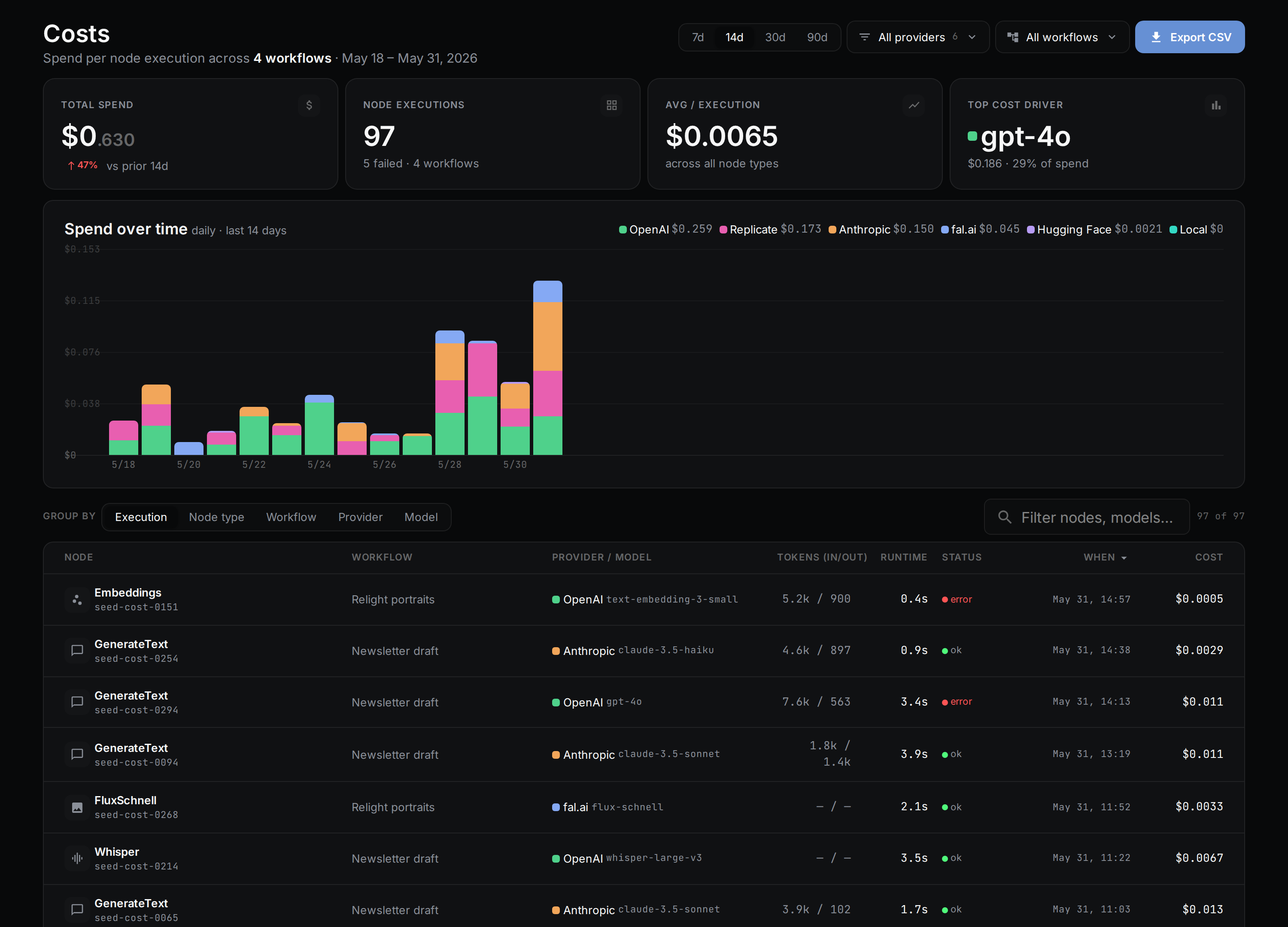
If the data cannot be loaded, the page says so instead of showing zeros.
From the terminal
nodetool costs reads the same records straight from the local database, with no server running. It has four subcommands: summary, list, by-provider, and by-model, and each takes --json. See nodetool costs for the options.
Supervisor spend lands in the same records, tagged supervisor in node_type, so it can be separated from the workflow’s own spend.
In traces
Runs emit OpenTelemetry spans. Every llm.chat and llm.stream span carries gen_ai.usage.input_tokens, gen_ai.usage.output_tokens, gen_ai.usage.total_tokens, and gen_ai.usage.cost_usd. Use --trace-file or --trace-stdout on CLI runs to see them. See observing agent execution.
Limiting spend
Limits apply in different places. Each one is described below with where it is set.
Agent runs
An agent run (a chat turn, its sub-agents, and any agent node it starts) shares one budget:
| Setting | Default | What it bounds |
|---|---|---|
NODETOOL_AGENT_TURN_COST_CAP_USD |
5.00 | Provider spend for the whole run, in US dollars. 0 means no cap. |
NODETOOL_AGENT_TURN_DEADLINE_MS |
1800000 (30 minutes) | Wall-clock time for the run. |
NODETOOL_AGENT_MAX_TURNS |
200 | Model turns in total. This still holds for a local model with no price. |
NODETOOL_AGENT_UNPRICED_TOKEN_CEILING |
400000 | Prompt tokens for a turn on a model the catalog does not price. |
The cost cap works as admission. A turn whose worst case would cross the cap is refused before the call, so the money is not spent first. A model without a catalog price has no worst case, so it is bounded by the token ceiling and counted as unpriced rather than free. On the command line, --cost-cap <usd> overrides the dollar cap for one run, and 0 lifts it, which suits a local-only install. See Run budget and the Agent CLI.
Mini apps
A published mini app has a Spend budget in its Settings: a period (per day, per month, or lifetime), a maximum spend in USD, and a maximum number of runs. An empty field means no limit. Runs of the released app are checked before they reach a provider, and Settings shows what has been used. A public link requires a budget with at least one finite limit, because visitors run the app on your account. Recent invocations list their cost, marked “est.” until the actual cost is known.
Storyboards
In the creative agent, spend is gated shot by shot. You approve a still before the clip is generated from it, and the cheap stage (stills) comes before the expensive one (clips).
Hosted credits
Where the nodetool provider is available, the server checks the credit balance before a run that uses a managed model starts. A run is refused in two cases:
- It names a managed model the operator did not open for spend. This is refused regardless of balance.
- The balance is empty, or does not cover the run’s estimate. The message reads like
This run needs about N credits but M remain.Spend already admitted to runs still in flight counts against the balance, so several simultaneous runs cannot each pass against the same balance.
Estimates are a floor, because an unpriced node estimates as zero. For that reason an empty balance blocks a managed run even when its estimate is zero. If the credit check itself fails, the run is allowed, so a metering fault never stops the runner.
How credits work
One credit is one US cent (USD 0.01) of provider spend at the delegate’s price. The balance is every grant ever recorded, minus the spend recorded for the nodetool provider, rounded up to whole credits. Spend on your own provider keys is excluded.
Grants arrive lazily, the first time the balance is read:
- A one-time welcome grant when you are first seen. The default is 500 credits.
- A monthly plan grant, keyed to the calendar month in UTC.
The plans are defined in code:
| Plan | Credits per month | Displayed price |
|---|---|---|
| Free | 300 | $0 |
| Creator | 3,000 | $12 per month |
| Pro | 10,000 | $40 per month |
The price is for display. Payment processing is not implemented, so switching plans takes effect immediately and no card is charged.
You see the balance in the Studio header as a credits chip, and on the Plan & credits page at /studio/account, which also lists the plans and switches between them. The page notes that credits meter only NodeTool’s managed models. The same data is available from the credits tRPC router (status, setPlan, and topup).
Operator settings
A server operator controls hosted credits with these environment variables:
| Variable | Effect |
|---|---|
NODETOOL_CREDIT_MODELS |
The managed models credits may be spent on, separated by commas, spaces, or newlines. Unset means the whole catalog. Any other model is refused before a key is used. |
NODETOOL_SIGNUP_CREDITS |
The one-time welcome grant. The default is 500. 0, a negative value, or an unparseable value means no welcome grant. |
NODETOOL_PLATFORM_FAL_KEY |
The platform-owned fal key that funds managed image and video models. |
NODETOOL_PLATFORM_ANTHROPIC_KEY |
The platform-owned Anthropic key that funds managed language models. |
NODETOOL_ENABLE_TEST_TOPUP |
Set to 1 or true to allow the test top-up on a development server. |
A managed model is offered only when its delegate provider has a platform key and the model is on the allowlist.
The top-up is for development only. It adds credits with no payment behind it, and the server refuses it unless NODETOOL_ENABLE_TEST_TOPUP is set, because minted credits unlock spend on platform-owned keys. When the variable is set, the account page shows an Add 1000 credits (test) button.
Known gaps
- The estimate cannot price a model the catalogs do not carry for the selected provider. Those rows show as unknown and stay out of the total.
- Credits have no payment provider behind them yet. Plan prices are displayed only.
For provider keys and setup, see Providers.