
Choose animation according to what must change. Sprite clips change an atlas frame. Visual tracks change presentation properties. A 3D animation graph chooses and blends prepared model clips.
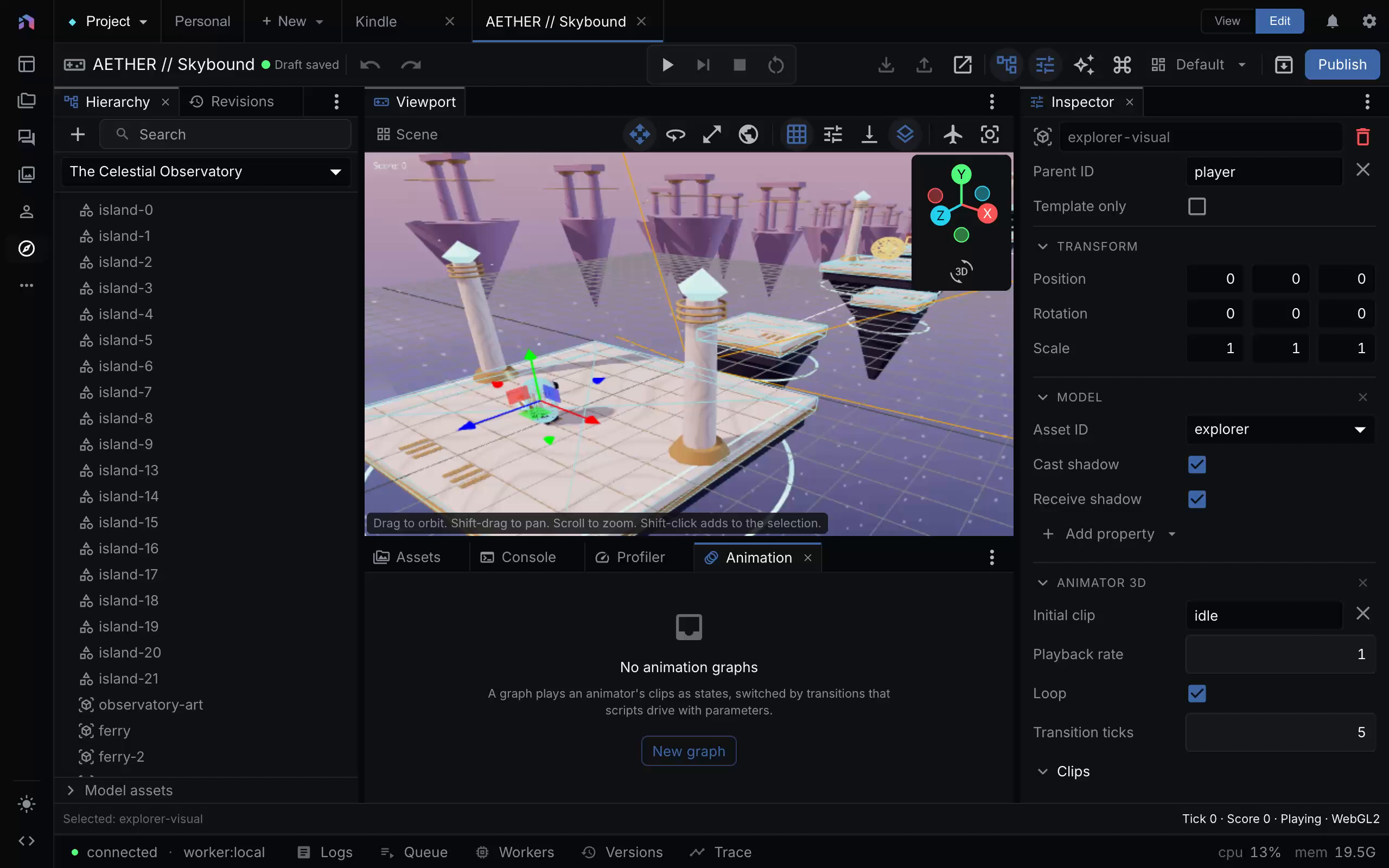
The selected model uses an initial idle clip. This example has no animation graph, as the Animation panel reports. A paused frame does not prove motion. Capture provenance.
Animate a sprite
Prepare a sprite sheet with aligned frames, then add an animator to the sprite entity. Its initial frames start when the entity spawns. Named clips provide additional sequences. A script command {kind: "playAnimation", clip: "run"} starts a clip from its first frame. Repeating the current clip request continues playback instead of restarting it.
For movement without new image frames, add visualAnimation. Tracks interpolate rotation, scale X/Y, opacity, or tint over durationTicks. Delay, repeat, ping-pong, and easing control timing. rotationRate gives a continuous spin and cannot share a rotation track.
These tracks do not move a collider. The final appearance combines authored values, tracks, script setVisual changes, then lifetime fade and scale. Use a body or movement command when motion must affect gameplay.
Animate a prepared model
Model preparation reports clip IDs and node IDs. An animator3d maps your clip aliases to those prepared IDs. Use an initial clip for simple playback or reference an animationGraphs entry for state-based animation.
A graph declares float, boolean, and trigger parameters. Its layers hold states and ordered transitions. A state can play one clip, a one-dimensional blend over a float, or a two-dimensional blend over two floats. Later layers can add motion and mask selected model nodes and descendants. The first layer is the unmasked base.
For locomotion, define a speed float and a blend with idle at 0, walk at 2, and run at 6. Return a setAnimParam command with the character’s planar speed. Clip aliases let another prepared rig use the same graph with different clip IDs.
Transitions can require parameter conditions, a minimum exitTicks, and a crossfade duration. Declaration order resolves competing transitions. A trigger resets when consumed. A layer already crossfading does not start another transition.
Verify state and pose separately
Graph state and parameter values survive session snapshots. The renderer samples the resolved pose at the interpolated tick. Use replay verification to check the graph state, then captures to inspect the pose and crossfade.
The pose sampler blends node translation, rotation, and scale. It does not blend morph targets. Root motion, retargeting, and ragdolls are outside the current engine. Changing a visual animation does not automatically change physics or a character controller.