
A provider is the adapter between a NodeTool node and an AI service: OpenAI, Anthropic, Gemini, a local Ollama daemon, or one of the 40+ others below. Every node that calls an LLM or a media model exposes a model property backed by a provider id. Pick a different provider from that same dropdown and the rest of the graph stays the same.
This is bring-your-own-key (BYOK). NodeTool does not mark up a provider’s price, and cloud usage is billed directly by the provider. The one exception is the nodetool provider, which exists only in NodeTool’s hosted cloud (see NodeTool managed models). Add a key in Settings → Models & Providers, or skip keys and run everything through local models (Ollama, vLLM, LM Studio, llama.cpp).
New to models and providers generally? Start with Models & Providers for the local-vs-cloud overview, or Supported Models for the full model catalog. This page is the provider reference: what each one does, which key it needs, and where to read more.
Capability matrix
Checked against each provider’s implementation in packages/runtime/src/providers/. A blank cell means that provider doesn’t expose the modality through NodeTool’s generic nodes, even where the underlying service might.
| Provider | Text | Image | Video | TTS | ASR | Embeddings | 3D |
|---|---|---|---|---|---|---|---|
| OpenAI | ✅ | ✅ | ✅ | ✅ | ✅ | ✅ | |
| Anthropic | ✅ | ||||||
| Azure OpenAI | ✅ | ✅ | ✅ | ✅ | ✅ | ||
| Amazon Bedrock | ✅ | ✅ | |||||
| Google Gemini | ✅ | ✅ | ✅ | ✅ | ✅ | ✅ | |
| xAI (Grok) | ✅ | ✅ | ✅ | ||||
| DeepSeek | ✅ | ||||||
| Groq | ✅ | ||||||
| Mistral | ✅ | ✅ | |||||
| Cerebras | ✅ | ||||||
| Alibaba Cloud | ✅ | ||||||
| GMI Cloud | ✅ | ||||||
| OpenRouter | ✅ | ✅ | ✅ | ✅ | ✅ | ✅ | |
| Requesty | ✅ | ||||||
| Opper | ✅ | ||||||
| API Route | ✅ | ||||||
| Together AI | ✅ | ✅ | ✅ | ✅ | ✅ | ✅ | |
| Moonshot (Kimi) | ✅ | ||||||
| Meta AI | ✅ | ✅ | ✅ | ||||
| MiniMax | ✅ | ✅ | ✅ | ✅ | |||
| Codex (OpenAI OAuth) | ✅ | ✅ | |||||
| Claude Agent SDK | ✅ | ||||||
| Antigravity | ✅ | ||||||
| Evolink | ✅ | ✅ | ✅ | ||||
| kie.ai | ✅¹ | ✅ | ✅ | ✅ | |||
| AKI | ✅ | ✅ | |||||
| Higgsfield | ✅ | ✅ | |||||
| UseAPI | ✅ | ✅ | |||||
| vgenv | ✅ | ||||||
| Replicate | ✅ | ✅ | ✅ | ✅ | ✅ | ✅ | |
| FAL | ✅ | ✅ | ✅ | ✅ | |||
| Comfy Cloud | ⁵ | ⁵ | |||||
| HuggingFace | ✅ | ✅ | ✅² | ✅ | ✅ | ✅ | |
| Ollama | ✅ | ✅ | |||||
| vLLM | ✅ | ✅ | ✅ | ||||
| LM Studio | ✅ | ||||||
| llama.cpp | ✅ | ||||||
| llama.cpp local | ✅ | ✅ | |||||
| stable-diffusion.cpp | ✅ | ||||||
| Transformers.js | ✅ | ✅ | ✅ | ✅ | |||
| ElevenLabs | ✅ | ✅³ | |||||
| Topaz | ✅⁴ | ||||||
| Reve | ✅ | ||||||
| AtlasCloud | ✅ | ✅ | ✅ | ✅ | ✅ | ||
| Cohere | ✅ | ||||||
| Voyage AI | ✅ | ||||||
| Jina AI | ✅ | ||||||
| Meshy AI | ✅ | ||||||
| Rodin AI | ✅ |
¹ Chat only for a fixed gateway list of GPT, Claude, Grok, Kimi, DeepSeek, and Gemini models (KIE_CHAT_MODELS in kie-provider.ts). Most kie.ai models are image, video, or audio.
² Text-to-video only; no image-to-video.
³ Via a dedicated Speech-to-Text node, not the generic ASR picker.
⁴ Upscale and enhancement, not text-to-image generation.
⁵ No models in the generic pickers — the Comfy API enumerates none. What comes out is whatever the ComfyUI graph you submit produces, through the lib.comfy.RunWorkflowOnCloud node.
Provider capabilities
Each provider lists the operations it implements by overriding BaseProvider.declaredCapabilities() (packages/runtime/src/providers/base-provider.ts). getCapabilities() always adds the two chat methods, so providers with no chat models (Meshy, Rodin, Higgsfield) throw when asked to chat. Some providers declare more than the matrix shows. Video-to-video, lip sync, upscaling, and music are examples, and they surface through agent tools and dedicated nodes, not the generic pickers. To make a model usable outside the node graph (an agent, the generate CLI command, the generation API), implement the matching method on the provider and declare its capability. The contract test packages/runtime/tests/providers/provider-capabilities-contract.test.ts fails when a declared capability has no implementation or a model in the provider’s catalog offers an undeclared task.
OpenAI
OpenAI covers chat (GPT), image generation (GPT-Image), Sora 2 Pro video, TTS, Whisper transcription, and embeddings — six of the seven modalities in the matrix above. Cloud only, keyed by OPENAI_API_KEY. Chat models are fetched live from the OpenAI API; image models are a maintained static list. See the OpenAI provider guide.
Anthropic
Anthropic runs Claude chat models with tool calling and image input for vision tasks. It doesn’t generate images, video, or audio. Cloud only, keyed by ANTHROPIC_API_KEY; models are fetched live from the Anthropic API. See the Anthropic provider guide.
Azure OpenAI
Azure OpenAI runs OpenAI models deployed in your own Azure OpenAI or Microsoft Foundry resource: chat, GPT Image generation and editing, TTS, Whisper transcription, and embeddings. Requests use OpenAI’s wire format, so each call behaves like the OpenAI provider with the deployment name as the model. Cloud only, keyed by AZURE_OPENAI_API_KEY and AZURE_OPENAI_ENDPOINT (for example https://<resource>.openai.azure.com, with or without a trailing /openai).
Azure does not report what a deployment serves, so the models are the names in AZURE_OPENAI_DEPLOYMENTS, separated by commas. A name containing image or dall-e is an image model, tts a speech model, whisper or transcribe a transcription model, and embedding an embedding model. Any other name is a chat model. Add :chat, :image, :tts, :asr, or :embedding to a name to set its kind, for example my-painter:image. For custom deployment names, append =underlying-model, for example speech-prod=gpt-4o-mini-tts or transcription-prod=whisper-1. The underlying model controls media capabilities, including speech instructions and word timestamps, while requests still route to the deployment name. An explicit kind may precede the mapping, such as speech-prod:tts=gpt-4o-mini-tts. Without AZURE_OPENAI_API_VERSION the provider calls the v1 API at <endpoint>/openai/v1. Set a dated version such as 2025-04-01-preview to use the /openai/deployments/<name> routes. Under the cloud profile the endpoint must be a public https host. A deployment named after its model, such as gpt-5.5, is priced from the Azure rates in @pydantic/genai-prices.
Amazon Bedrock
Amazon Bedrock runs chat through the Converse API, which covers every Bedrock chat model: Claude, Llama, Mistral, Amazon Nova, and others. It streams text and tool calls, accepts images and documents, and passes Claude extended thinking through. Image generation runs Amazon Nova Canvas, Titan Image, and Stability models. Cloud only, keyed by an IAM access key in BEDROCK_ACCESS_KEY_ID and BEDROCK_SECRET_ACCESS_KEY, with BEDROCK_SESSION_TOKEN for temporary credentials. The keys are separate from the AWS_* variables so an S3 storage key is never used for Bedrock.
BEDROCK_REGION picks the region (default us-east-1). Models are listed from that region: on-demand foundation models plus the system-defined cross-region inference profiles such as eu.anthropic.claude-sonnet-4-6, which Claude needs in most regions. The IAM user needs bedrock:ListFoundationModels, bedrock:ListInferenceProfiles, bedrock:InvokeModel, and bedrock:InvokeModelWithResponseStream. Set BEDROCK_MODEL_IDS to a comma-separated list of model or inference profile IDs to offer only those and skip the listing calls. Costs are priced from the AWS rates in @pydantic/genai-prices.
Google Gemini
Gemini handles chat with native multimodal input (images, audio, video as Blobs), Nano Banana image generation (the gemini-*-image models), Veo video, Gemini TTS, Lyria music, audio transcription, and text embeddings. Cloud only, keyed by GEMINI_API_KEY. Text models auto-fetch. The image, video, TTS, and music models are static lists. Imagen is not available because Google shut it down in the Gemini API. See the Gemini provider guide.
xAI (Grok)
xAI runs Grok chat models plus Grok Imagine for text-to-video, image-to-video, and text-to-image, all classified from the same /v1/models response. Cloud only, keyed by XAI_API_KEY. See the xAI provider guide.
DeepSeek
DeepSeek is chat only — DeepSeek-V3 and the R1 reasoning line — reached through an OpenAI-compatible endpoint. Cloud only, keyed by DEEPSEEK_API_KEY. See the OpenAI-compatible providers guide for how its models are fetched.
Groq
Groq runs chat models on its LPU inference hardware for low-latency responses. Text only — no image, video, or audio generation. Cloud only, keyed by GROQ_API_KEY. See the OpenAI-compatible providers guide.
Mistral
Mistral runs chat models (Mistral, Mixtral) plus one embedding model, mistral-embed. Cloud only, keyed by MISTRAL_API_KEY. See the OpenAI-compatible providers guide.
Cerebras
Cerebras runs chat models on its high-throughput inference hardware. Text only. Cloud only, keyed by CEREBRAS_API_KEY. See the OpenAI-compatible providers guide.
Alibaba Cloud
Alibaba Cloud Model Studio serves the Qwen chat models — qwen3-max, qwen-plus, qwen-flash, qwen-turbo, and the qwen3-vl vision line — with streaming and tool calling. Text only. Cloud only, keyed by DASHSCOPE_API_KEY, over the DashScope OpenAI-compatible endpoint (default https://dashscope-intl.aliyuncs.com/compatible-mode/v1, the international/Singapore region); models are fetched live from its /models endpoint. Model Studio keys are region-scoped — set DASHSCOPE_BASE_URL to your region’s /compatible-mode/v1 endpoint when the key was created outside Singapore. Tool calling is gated per model family: Qwen-Math, QVQ, OCR, translation, and audio models are outside Alibaba’s function-calling list and are not sent tools. Get a key at Model Studio. See the OpenAI-compatible providers guide.
GMI Cloud
GMI Cloud is an OpenAI-compatible chat endpoint for open-weight models — Llama, DeepSeek, and Qwen variants. Text only. Cloud only, keyed by GMI_API_KEY.
OpenRouter
OpenRouter proxies 300+ chat models, image generation, Gemini image editing, and text-to-video and image-to-video models (Veo, Seedance, Kling, Wan) through a single key. Reference-to-video is not supported because OpenRouter accepts reference media only as public HTTPS URLs. Cloud only, keyed by OPENROUTER_API_KEY. See the OpenAI-compatible providers guide.
Requesty
Requesty routes chat models from OpenAI, Anthropic, Google, DeepSeek, xAI and others through one OpenAI-compatible endpoint, https://router.requesty.ai/v1. Text only. Cloud only, keyed by REQUESTY_API_KEY. The model picker lists the managed models from /v1/models/managed (short ids such as gpt-5.4-mini) followed by the full vendor/model catalog from /v1/models (for example openai/gpt-4o-mini). Get a key at Requesty. See the OpenAI-compatible providers guide.
API Route
API Route serves hosted chat models through https://global.api-route.com/v1. Set API_ROUTE_API_KEY in Settings > API Keys or the environment. The model picker reads /v1/models, keeps OpenAI-compatible routes, and uses the shared model classifier to exclude image/video entries by metadata or model ID. Chat IDs without endpoint metadata remain available for older catalogs. This integration exposes text chat and tool calls. Get a key at API Route, then select a model available to that key. API Route is a paid service. See its setup guide and pricing.
Opper
Opper is an EU-hosted AI gateway that routes chat models from 50+ providers, including OpenAI, Anthropic, Google, DeepSeek and Moonshot, through one OpenAI-compatible endpoint, https://api.opper.ai/v3/compat. Text only. Cloud only, keyed by OPPER_API_KEY. The model picker lists Opper’s pools from /v3/compat/models?type=pool (bare ids such as claude-sonnet-4-6, routed across providers) followed by the full catalog from /v3/compat/models, which adds provider/model ids that pin one route. Get a key at Opper. See the OpenAI-compatible providers guide.
Together AI
Together AI is one of the broadest providers in NodeTool: chat, manifest-driven image and video generation, TTS (Orpheus, Kokoro, Cartesia Sonic), ASR (Whisper Large v3, Voxtral, Parakeet), and one embedding model. Cloud only, keyed by TOGETHER_API_KEY. See the Together provider guide.
Moonshot (Kimi)
Moonshot runs Kimi chat models over its OpenAI-compatible endpoint (https://api.moonshot.ai/v1). Text only. Cloud only, keyed by KIMI_API_KEY. See the OpenAI-compatible providers guide.
MiniMax
MiniMax covers chat, image (Image-01), video (Hailuo 2.3), TTS, and music generation in one provider. ASR and embeddings exist in MiniMax’s API but are disabled in NodeTool’s provider (embeddings need a GroupId NodeTool doesn’t manage) — use another provider for those. Cloud only, keyed by MINIMAX_API_KEY. See the MiniMax provider guide.
Meta AI
Meta AI serves the Muse family at https://api.meta.ai/v1. Cloud only, keyed by META_API_KEY.
- Chat. Muse Spark runs on Meta’s Responses API with tool calling. A
web_searchtool is answered by Meta’s hosted search grounding, and tools markeddeferLoadingare loaded on demand by Meta’s hosted tool search. Messages can carry images, video and audio, which Muse Spark reads natively. If the model list cannot be fetched, the picker falls back to four built-in Muse Spark ids. - Images. Muse Image (
muse-image-1.0) generates and edits images, with up to 10 source images per edit. - Speech to text. Muse Voice Transcribe (
muse-voice-transcribe-1.0) returns the transcript and timed turns. Audio that is not mono 16-bit WAV at 16 or 24 kHz is converted with ffmpeg first. It has no word-level timestamps. - Segmentation. SAM 3.1 (
sam-3.1) segments an image from a short noun phrase, a box, or points, and returns one full-frame mask per object.
Codex (OpenAI OAuth)
Codex reaches GPT chat models and GPT Image generation (GPT Image 2 and 1.5) through your ChatGPT/Codex OAuth session instead of an API key, and usage bills against that subscription. Sign in with the Codex card in Settings → Models & Providers. The provider reads the stored CODEX_ACCESS_TOKEN, so no OPENAI_API_KEY is needed.
Claude Agent SDK
Claude Agent SDK reaches Claude by running your local, logged-in claude CLI in headless mode instead of calling the Anthropic API directly, billing against your Claude subscription rather than per-token API spend. Install Claude Code first. NodeTool finds claude on your PATH or in the usual install locations, or set CLAUDE_CLI_PATH in Settings → Integrations to point at it. It supports tool calls, which run inside NodeTool while the CLI drives the loop. Images in the prompt are forwarded when they are inline PNG, JPEG, GIF, or WebP data. A remote image URL is rejected, so resolve media references before the call. There is no API key. Sign in with the Claude Code card in Settings → Models & Providers or run nodetool auth claude login (add --manual on a headless host). The provider is not available in NodeTool’s hosted cloud because it needs a local executable. See the Anthropic provider guide.
Antigravity
Antigravity reaches the models in Google’s Antigravity CLI (agy), including Gemini, by running the CLI in headless mode on your signed-in Antigravity account. There is no API key. Install agy and run it once in a terminal to sign in. NodeTool also looks for the CLI in ~/.local/bin, where the official installer puts it. The model list is whatever agy models prints, and effort is part of each model id (for example gemini-3.1-pro-high).
Each turn spawns agy in an empty scratch directory under the system temp folder, so the CLI’s own file tools cannot touch your files. Shell commands stay blocked because NodeTool never passes --dangerously-skip-permissions. NodeTool tools are not offered to the model, and prompts must be text: a message with images fails instead of losing them. A forced single tool call (structured output) uses the CLI’s --json-schema. Follow-up turns in a chat resume the same Antigravity conversation with --conversation. The provider is not available in NodeTool’s hosted cloud because it needs a local executable.
Evolink
Evolink is an OpenAI/Anthropic-compatible gateway: one key for GPT, Claude, Gemini, and DeepSeek chat, plus image (GPT Image 2, Nano Banana 2, Seedream) and video (Seedance, Wan, Veo, Sora, Grok) generation. Cloud only, keyed by EVOLINK_API_KEY.
kie.ai
kie.ai is a multi-model aggregator: manifest-driven image, video, TTS, and music models (Seedance, Runway, Wan, Kling, FLUX.2, Suno, and more), plus chat for a fixed list of gateway models (GPT, Claude, Grok, Kimi, DeepSeek, and Gemini families). One key covers all of it. kie.ai often lists lower prices than the upstream provider, so compare before you commit. Cloud only, keyed by KIE_API_KEY. See the KIE provider guide.
AKI
AKI is an OpenAI-compatible gateway for chat plus text-to-image and image-to-image generation. Cloud only, keyed by AKI_API_KEY.
Higgsfield
Higgsfield generates image and video from a manifest of models (text-to-image, image-to-image, text-to-video, image-to-video, reference-to-video, video-to-video, extend). No chat. Cloud only. It needs two secrets, HIGGSFIELD_API_KEY_ID and HIGGSFIELD_API_KEY_SECRET. The Higgsfield card in Settings accepts them as one pasted key-id:secret value.
UseAPI
UseAPI generates image and video through your own Google Flow and Dreamina accounts on useapi.net: Nano Banana and Veo models through Google Flow, Seedream, Seedance, and Sora 2 through Dreamina. No chat. Cloud only, keyed by USEAPI_API_TOKEN. Set USEAPI_GOOGLE_FLOW_EMAIL (Google Flow account email) and USEAPI_DREAMINA_ACCOUNT (region:email) so reference image uploads use the right account.
vgenv
vgenv is an independent API for MiniMax H3 video, not affiliated with MiniMax. It runs text-to-video, image-to-video with a first and optional last frame, and reference-to-video with up to nine ordered images. Models are the Fast, Standard, Enhanced, and Quality tiers at 480p or 768p, 4 to 15 seconds. Prompts are sent as written, with vgenv’s prompt rewriting turned off. No chat. Cloud only, keyed by VGENV_API_KEY. vgenv bills each video from a prepaid balance at creation and releases the hold when a preparing or queued job is cancelled or the platform fails it. NodeTool cancels the job when a run is stopped or times out.
Replicate
Replicate runs chat, image, video, and music, plus curated TTS, ASR, and embedding models. Chat calls replicate.run()/.stream() on whatever model id you pass, so it isn’t limited to a fixed model list the way most other providers are; image, video, and music nodes are generated from Replicate’s schemas. Cloud only, keyed by REPLICATE_API_TOKEN. See the Replicate provider guide.
FAL
FAL generates image, video, TTS, and music from models whose nodes are generated straight from FAL’s OpenAPI schemas. Chat goes through fal’s OpenAI-compatible route, which is OpenRouter’s router, so chat model ids are OpenRouter’s catalog. Cloud only, keyed by FAL_API_KEY (FAL_KEY also works). See the FAL provider guide.
Comfy Cloud
Comfy Cloud runs a ComfyUI workflow graph on cloud.comfy.org — no local ComfyUI install, no GPU of your own. It is reached through the lib.comfy.RunWorkflowOnCloud node rather than a model dropdown: the graph you paste in names its own checkpoints and LoRAs, so the provider lists no models and doesn’t appear in the generic image or video pickers. Cloud only, keyed by COMFY_API_KEY from https://platform.comfy.org. The same key also authenticates partner API nodes inside the submitted graph. See ComfyUI.
HuggingFace
HuggingFace routes chat, image, text-to-video, TTS, ASR, and embeddings to Hugging Face Inference Providers. The model lists are the most-liked warm inference models for each task, fetched from the Hub and cached for 10 minutes. Tool calling is off for this provider. A HF_TOKEN is required: paste a token with the Inference Providers permission into the HuggingFace card, or set HF_TOKEN in the environment. The 19 huggingface.* task nodes use the same token. See HuggingFace Integration.
Ollama
Ollama runs chat and embedding models locally, with no API key and no per-token cost. It is a separate program: install it from ollama.com and keep it running, because NodeTool does not ship or start it. Pull a model with ollama pull <model> and it appears in NodeTool. The server URL comes from OLLAMA_API_URL (default http://127.0.0.1:11434), set in Settings → Integrations → Local Model Servers or the environment. OLLAMA_CONTEXT_LENGTH and OLLAMA_KEEP_ALIVE are in Configuration. See the Ollama provider guide.
vLLM
vLLM points NodeTool at a self-hosted, OpenAI-compatible vLLM server for chat, embeddings (/v1/embeddings), and transcription (/v1/audio/transcriptions). Models appear from its /v1/models endpoint once the URL is set. /v1/models does not report a model’s task, so every served model is offered for each task and the server rejects an unsupported call. Set VLLM_BASE_URL (no default) and VLLM_API_KEY if your deployment requires one. See Local Inference.
LM Studio
LM Studio connects to the local server that LM Studio’s desktop app exposes. Enable it in LM Studio → Local Server and NodeTool picks up loaded models automatically. The default URL is http://127.0.0.1:1234, overridden with LMSTUDIO_API_URL. LMSTUDIO_API_KEY is optional. See Local Inference.
llama.cpp
llama.cpp points NodeTool at a local llama-server instance for chat. llama-server constrains generation with a grammar built from the tool schemas, so tool calling works for any model it serves. Set LLAMA_CPP_URL (required, no default). See Local Inference.
llama.cpp local
llama.cpp local (provider id node_llama_cpp) runs GGUF models inside the NodeTool backend through the node-llama-cpp binding, with no separate server. It serves chat and embeddings. Models are GGUF files in NODE_LLAMA_CPP_MODELS_DIR, which defaults to the shared llama.cpp cache. NODE_LLAMA_CPP_GPU_BACKEND selects auto, metal, cuda, vulkan, or cpu. No key. Local only.
The model picker also offers GGUF models to download: a curated list in node-llama-cpp-models.ts, then the trending models in node-llama-cpp-trending.generated.ts. A nightly workflow (.github/workflows/gguf-trending-sync.yml) runs npm run sync:gguf-trending, which reads the trending GGUF repos and opens a PR when the list changes. It keeps chat models from the trusted publishers in scripts/gguf/sources.json, skips uncensored and merged variants, and picks one Q4 file of 20 GB or less from each repo. It keeps up to 50 models, one repo for each base model.
whisper.cpp (whisper_cpp) transcribes audio inside the backend through the
optional @fugood/whisper.node@1.1.3 package. Install it from Package Manager.
GGML models use the Hugging Face hub cache. WHISPER_CPP_MODELS_DIR adds a
directory, and WHISPER_CPP_GPU_BACKEND selects auto, metal, cuda,
vulkan, or cpu. Restart the backend after changing the GPU backend.
whisper_cpp.LiveTranscription transcribes streaming PCM16 audio, with Silero
VAD or fixed windows when no VAD model is installed. Local only.
whisper.cpp server (whisper_cpp_server) posts audio to a user-run
whisper-server at WHISPER_CPP_SERVER_URL. Its model id is default.
It requires no native package. Local only.
stable-diffusion.cpp
stable-diffusion.cpp (provider id stable_diffusion_cpp) generates images locally: text-to-image and image-to-image. It starts the sd-server binary from the sd-cpp runtime package on the first generation and keeps it running while the same model is in use. Install the package in Settings › Packages, or run nodetool runtime add sd-cpp. SD_CPP_SERVER_PATH selects another sd-server. The model picker offers each model with a Download button. A model can load files from several Hugging Face repositories, and one click downloads all of them into the Hugging Face cache. Text encoders and VAEs that several models share download once.
The catalog is in packages/runtime/src/providers/sdcpp-models.ts:
- Text-to-image: SD-Turbo, Stable Diffusion 1.5 and 3.5 Medium, FLUX.1 schnell and dev, Z-Image and Z-Image Turbo, Z-Image L2P, Krea 2 Raw and Turbo, Ideogram 4, Iris 3B.
- Text-to-image and editing with a reference image: FLUX.2 dev, FLUX.2 klein 4B and 9B (distilled and base), FLUX.3 Image Klein and Klein Base, Qwen Image 2.1, LLaDA-Image Turbo.
- Editing only: FLUX.1 Kontext dev, Qwen Image Edit 2509 and 2511, LongCat Image Edit, Boogu Image Edit, Mage-Flow Edit Turbo, and the PiD 4× upscaler.
An edit model receives the source image as a reference. Other models denoise from it, controlled by strength. Some weights have a non-commercial license, for example FLUX.1 dev, FLUX.2 klein 9B and PiD. The macOS build needs macOS 26 or later. Windows and Linux use the Vulkan build. No key. Local only. The lib.stable_diffusion_cpp.GenerateImage node is separate: it calls an sd-server that you start yourself.
Transformers.js
Transformers.js (provider id transformers_js) runs small ONNX models in-process: chat, TTS, music (MusicGen, instrumental only), ASR, and embeddings. Models download from the Hugging Face Hub on first use into <data-dir>/transformers-js-cache, or the directory in TRANSFORMERS_JS_CACHE_DIR. Tool calling is off. No key. Local only. The matching workflow nodes are the transformers.* nodes in HuggingFace Integration.
Local Python providers
When the Python worker runs with the matching pack installed, it registers its own providers over the stdio bridge, such as MLX on Apple Silicon and local Hugging Face execution. Install the packs from Package Manager → Python nodes, or see Python nodes without the desktop app. With NODETOOL_PYTHON_ON_DEMAND=true, these providers appear only after a workflow has started the worker. The worker’s huggingface provider appears as huggingface-local because the TypeScript runtime already owns the huggingface id for the hosted API. These providers offer image, video, TTS, music, ASR, and embedding models from the worker’s pack.
NodeTool managed models
The nodetool provider runs a curated model catalog on NodeTool’s own platform keys and meters usage against a credit balance. It exists only in NodeTool’s hosted cloud. Desktop and self-hosted installs do not register it, and they use your own keys for every provider here.
Custom OpenAI-compatible endpoints
Any endpoint that speaks the OpenAI API can be a provider. In Settings → Models & Providers, use Add endpoint and enter a name, a slug, a base URL, and an optional API key. Chat models come from GET <base_url>/models unless you list ids yourself. Image models (/images/generations) and video models (/videos) are detected from the list, and you can add ids the detection misses. The provider id is custom_<slug>. On a server you can skip the UI and set CUSTOM_<SLUG>_BASE_URL and CUSTOM_<SLUG>_API_KEY as environment variables. See Custom Providers for the fields, model discovery, and editing.
ElevenLabs
ElevenLabs covers text-to-speech, with a large static voice and model catalog, and speech-to-text, plus realtime WebSocket variants of both. Cloud only, keyed by ELEVENLABS_API_KEY. See the ElevenLabs provider guide.
Topaz
Topaz enhances existing images and video — upscale, sharpen, denoise, restore — rather than generating from a prompt. Only the enhance and enhance-gen endpoints appear in the generic image-model picker; the rest (sharpen, denoise, lighting, matting, restore) are dedicated nodes. Cloud only, keyed by TOPAZ_API_KEY. See the Topaz provider guide.
Reve
Reve creates, edits, and remixes images through three dedicated nodes (CreateImage, EditImage, RemixImage); the runtime provider also exposes create and edit to the generic image picker. Cloud only, keyed by REVE_API_KEY. See the Reve provider guide.
AtlasCloud
AtlasCloud generates image, video, speech, music, and 3D assets from a hand-maintained manifest (Seedance, GPT Image 2, Nano Banana, and more), transcribes audio, and lists chat models from its API. Cloud only, keyed by ATLASCLOUD_API_KEY. See the AtlasCloud provider guide.
Cohere
Cohere provides text embeddings — embed-v4.0 and the English/multilingual v3 line. No chat and no reranking in NodeTool’s current provider. Cloud only, keyed by COHERE_API_KEY.
Voyage AI
Voyage AI provides text embeddings only. Cloud only, keyed by VOYAGE_API_KEY.
Jina AI
Jina AI provides text embeddings only. Cloud only, keyed by JINA_API_KEY.
Meshy AI
Meshy generates textured 3D meshes from text or a reference image, through the generic nodetool.model3d.TextTo3D / ImageTo3D nodes. Cloud only, keyed by MESHY_API_KEY.
Rodin AI
Rodin generates 3D assets from text or a reference image, through the generic nodetool.model3d.TextTo3D / ImageTo3D nodes. Cloud only, keyed by RODIN_API_KEY.
Generic nodes: provider-agnostic workflows
Nodes in the nodetool.* namespace take a model property and route to whichever provider owns that model — this is what makes switching providers a dropdown change, not a rewiring job.
| Node | Switches between |
|---|---|
nodetool.agents.Agent |
OpenAI, Anthropic, Gemini, xAI, DeepSeek, Ollama, any chat provider |
nodetool.image.TextToImage |
FLUX.2, Nano Banana 2.0, GPT Image 2, Ideogram V3, Z-Image, HuggingFace, MLX |
nodetool.image.ImageToImage |
HuggingFace, local servers, cloud services |
nodetool.video.TextToVideo |
Sora 2 Pro, Veo 3.1, Seedance 2.0, Runway, Grok Imagine, Wan 2.6, Hailuo 2.3, Kling 3.0, HuggingFace |
nodetool.video.ImageToVideo |
Sora 2 Pro, Veo 3.1, Seedance 2.0, Runway, Luma, Grok Imagine, Wan 2.6, Hailuo 2.3, Kling 3.0 |
nodetool.model3d.TextTo3D / ImageTo3D |
Meshy AI, Rodin AI, AtlasCloud |
nodetool.audio.TextToSpeech |
OpenAI TTS, ElevenLabs, HuggingFace, local TTS |
nodetool.text.AutomaticSpeechRecognition |
OpenAI Whisper, HuggingFace, local ASR |
A generic node drops parameters the selected provider doesn’t support instead of erroring. Negative prompt, guidance scale, and seed apply mostly to diffusion-style backends, and GPT-Image and similar API-only models ignore them.
Reach for a provider-specific node only when you need something the generic interface doesn’t carry, such as MiniMax text to speech with its emotion and pitch controls.
Getting keys in
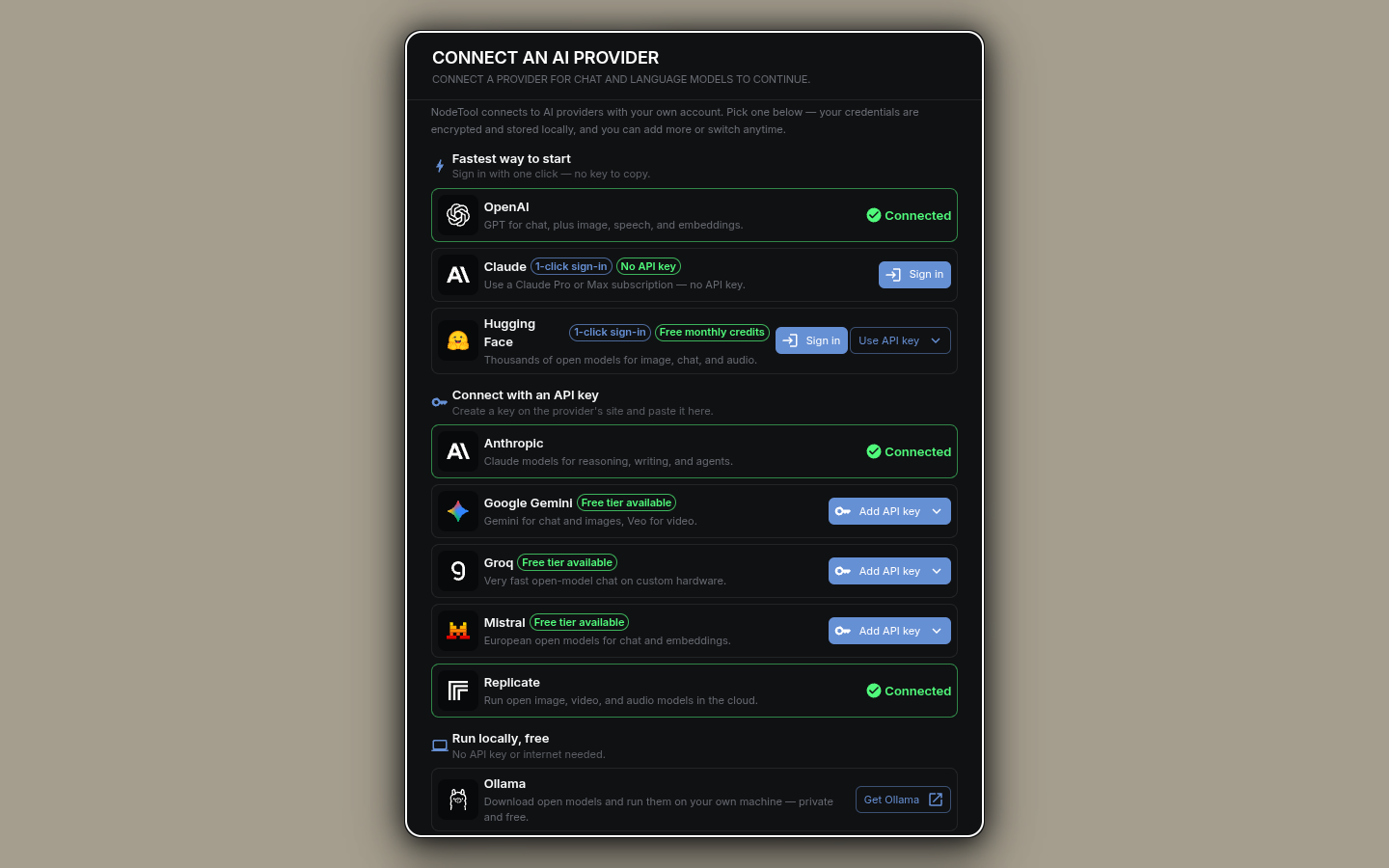
Wherever a missing provider blocks you (a model dropdown, a node warning, the getting-started checklist), NodeTool opens the Connect an AI provider dialog in place. It groups providers under Sign in with your account (Claude subscription, OpenAI, Hugging Face) and Use an API key. On desktop and localhost it also points at Ollama for running locally at no cost. A pasted key is checked against the provider before it is saved. If the provider rejects it, the dialog does not save it unless you choose to. If the provider cannot be reached, the key is saved and the dialog says it is unverified.
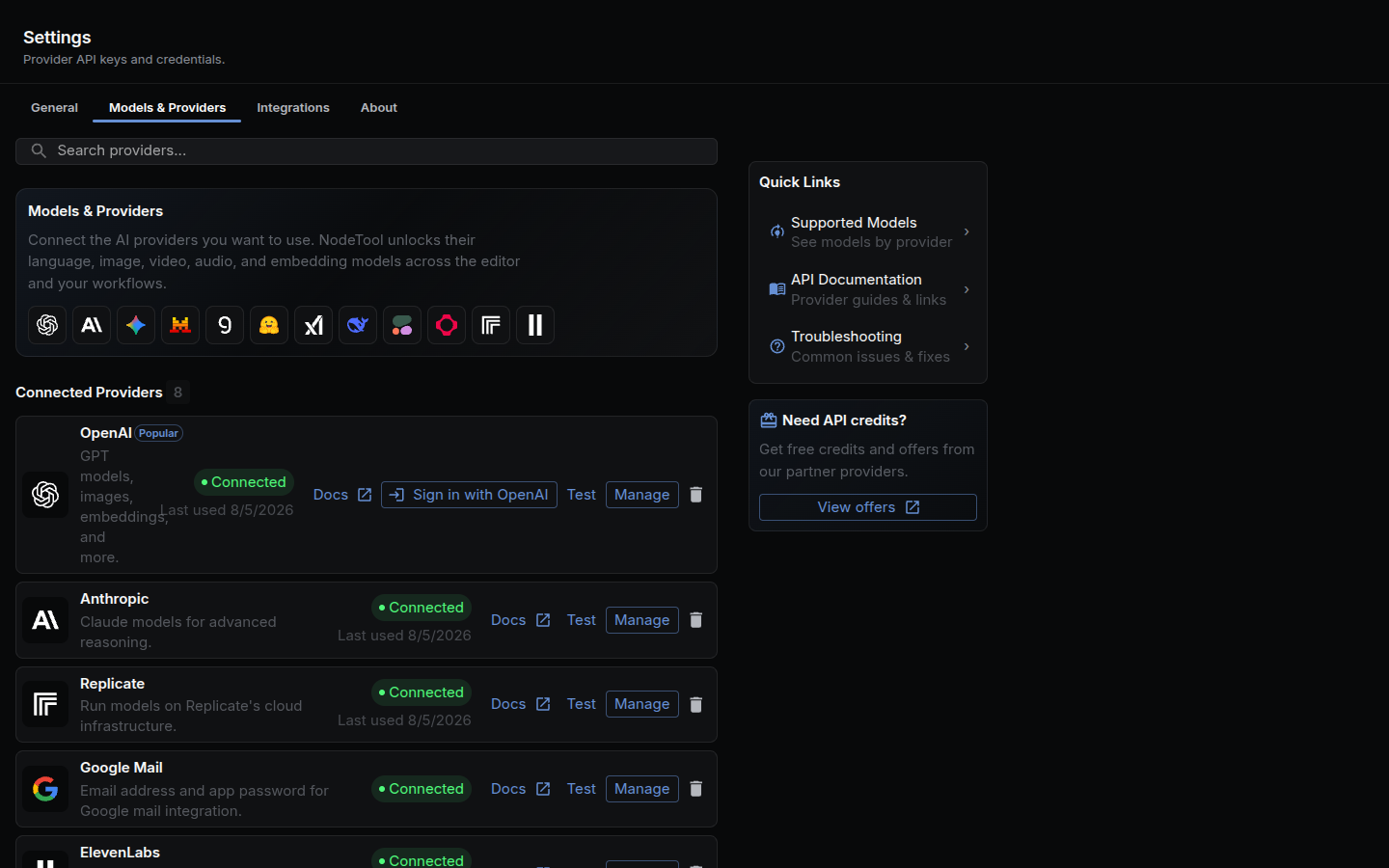
Settings → Models & Providers is the full list, grouped as Popular, Language Models, Media Generation, Gateways & Hubs, Web Search, Compute & Local, and Services & Advanced. Each configured provider has a Test button that calls the provider to confirm the key still works, and a Manage button to replace it. Codex and Claude Code offer sign-in with your account instead of a key. The dialog’s OpenAI sign-in stores a ChatGPT Codex token, so it enables the codex provider and leaves openai unconfigured until you paste an API key. Claude Code sign-in is hidden on hosted deployments because it finishes on the server’s own machine.
NodeTool stores every key encrypted (AES-256-GCM) in a local SQLite database, not in a plaintext config file. See Configuration for how the encryption key itself is managed.
From the CLI:
nodetool secrets store OPENAI_API_KEY   # prompts for the value, stores it encrypted
nodetool secrets list                   # list stored keys (values are never shown)
nodetool secrets get OPENAI_API_KEY     # print a stored value
Or set the variable directly in .env.development.local or your shell environment. A secret stored in the database wins over an environment variable of the same name, and the environment variable is the fallback when nothing is stored (the exceptions are SUPABASE_URL, SUPABASE_KEY, SUPABASE_SERVICE_ROLE_KEY, and SERVER_AUTH_TOKEN, where the environment wins). FAL_KEY is accepted in place of FAL_API_KEY. See Configuration for the full load order.
Local providers (Ollama, vLLM, LM Studio, llama.cpp) don’t need a key. Point NodeTool at the server’s URL instead. For vLLM (VLLM_BASE_URL), llama.cpp (LLAMA_CPP_URL), and LM Studio (LMSTUDIO_API_URL), set it under Settings → Integrations → Local Model Servers or as an environment variable. Ollama reads OLLAMA_API_URL from the environment or the secret store. In NodeTool’s hosted cloud these local providers are not registered, unless the server runs with NODETOOL_NODE_PROFILE=full.
Tracking spend
Every cloud call records its token counts and cost. The Costs page (/costs, or Costs under the app pages in the left panel’s More tab) shows them over 7, 14, 30, or 90 days, grouped by execution, node type, workflow, provider, or model, so you can see which pipeline is expensive before the invoice does.
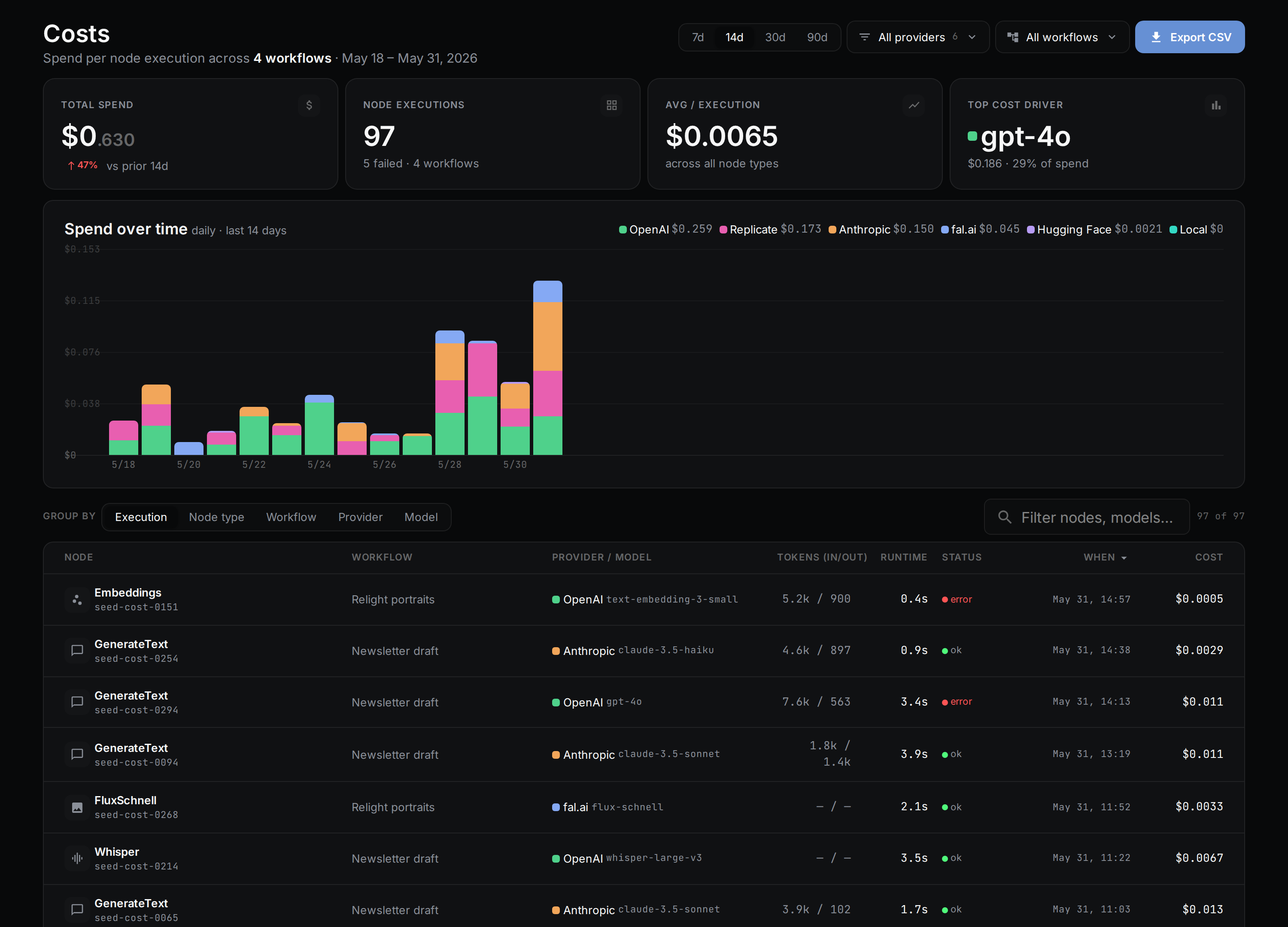
The same records are readable from the terminal: nodetool costs summary, costs list (filter with --provider and --model), costs by-provider, and costs by-model. Each takes --json. For estimates before a run, spend limits, and hosted credits, see Costs and credits.
Adding a new provider
Every provider is a class in packages/runtime/src/providers/ extending BaseProvider (or OpenAIProvider / AnthropicProvider for OpenAI- or Anthropic-compatible APIs), registered in provider-registry.ts with the environment variables it needs. The right approach differs by provider — live model discovery, a hand-maintained manifest, or codegen from upstream schemas — so follow the Provider Guides runbook for your case rather than reverse-engineering it from an existing provider. Before opening a PR, run npm run test:affected, npm run typecheck, and npm run lint.
See also
- Models & Providers — local vs. cloud, mixed workflows, getting started
- Supported Models — the full model catalog and local inference engines
- Installation — install NodeTool on Windows, macOS, Linux
- Comparisons — NodeTool vs. ComfyUI, n8n, Dify, Flowise, Langflow, Weavy
- Chat API — WebSocket API for chat interactions and provider routing
- Global Chat and Agent Mode — using providers interactively and through the planning agent
- Workflow API — building workflows with providers
- Provider Guides — runbooks for adding models and nodes to each provider