
The agent can inspect a game, prepare assets, apply document operations, run a playtest, capture frames, and build a standalone player. Give it a concrete outcome and preserve the distinction between a draft, a staged asset, and a published revision.
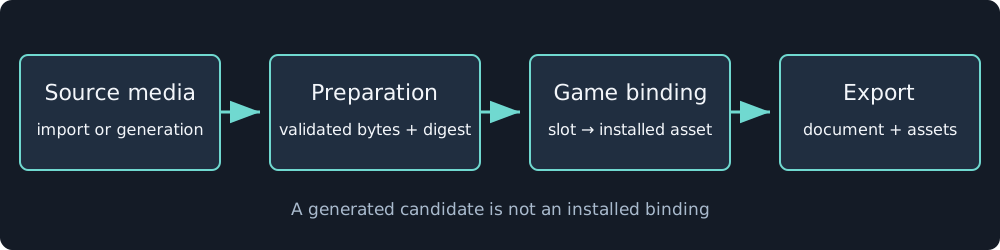
Assets become playable through preparation and binding. Generating media alone does not install it in a game.
Request a bounded change
In this draft, add a checkpoint before the last jump. Keep the movement settings and existing asset bindings. Test falling after the checkpoint, manual recovery, completion, and snapshot replay. Show the changed document operations and capture the checkpoint view.
The agent should read the current draft and its validation results first. edit_native_game applies structured operations such as entity updates, scene settings, input bindings, UI trees, animation graphs, and audio or performance settings. It must preserve unrelated fields when an operation replaces a whole object.
Use full resource IDs in saved documents. An asset slot is a logical name inside the game, while an installed asset ID identifies owned media. A prepared model node ID identifies geometry inside that asset. They are not interchangeable.
Use existing tools
The native-game tool family includes creation and editing, example installation, asset browsing and generation, playtesting, frame capture, and building. Read the installed native-game skill for current tool schemas and required preparation order.
Workflow nodes provide Load Game Template, Slot Prompt, and Stage Game Assets. The guided game flow creates a design and asset graph before assembling the game. Staging produces candidate bindings. Installation is the step that makes them part of the destination project.
The JavaScript sandbox’s game builder provides retained construction and preview/apply operations. See construction. For direct integration, use the API reference and existing game procedures rather than modifying database rows or UI state behind the editor.
Require evidence appropriate to the change
Validation checks schema and references. A playtest checks runtime behavior for its inputs. Replay checks restoration. Captures check appearance. Browser play checks physical controls, audio unlocking, and host behavior. A standalone smoke test checks the exported package.
Ask for the evidence needed by the change, including actual exit statuses. A screenshot cannot prove a win condition, and a successful simulator cannot prove sound playback or touch usability. Debugging lists the commands for those boundaries.