
A player save stores intentional progress or settings. A session snapshot stores simulation state for restoration. A replay supplies the input frames needed to reproduce the session. These are separate from the authored game document.
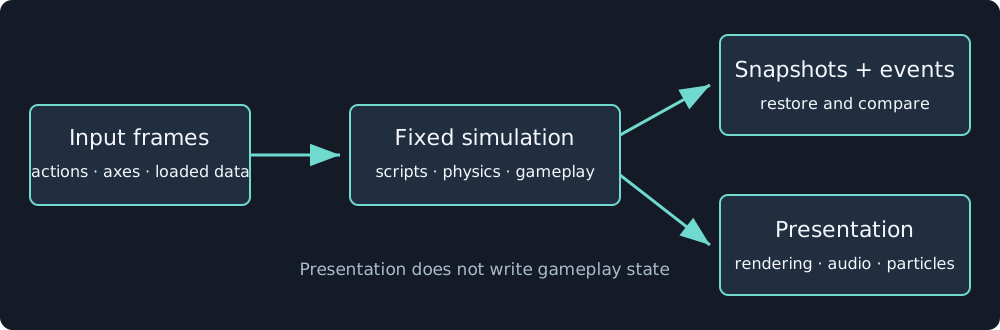
Replay compares simulation state and events. Pixels, sound mixing, and particle fields have separate presentation checks.
Save progress or settings
Scripts return save {slot, data, scope?} and load {slot, scope?} commands. Scope defaults to progress. Settings uses a separate store. Slot names contain letters, digits, underscores, or hyphens. Data is a bounded JSON object.
({ onStart() {
  return { commands: [{ kind: "load", slot: "progress" }] };
}, onUpdate(input) {
  const loaded = input.loaded?.find((item) => item.slot === "progress");
  return { state: loaded ? { best: loaded.data?.best ?? 0 } : input.state };
} })
Loads arrive on later input frames. Empty or failed loads return null data. Keep the values needed for play in script state. Recorded loaded frames replay without contacting storage.
Standalone players use IndexedDB. Editor play uses localStorage, and CLI simulation keeps saves in memory. A progress save may request snapshot: true in the player. Settings saves cannot include snapshots, and the editor retains the data without the snapshot. Saves are local to that host and browser, not automatic cloud synchronization.
Restore the simulation
Snapshots include gameplay state such as entity state, script state, timers, UI overrides, and animation graph state. Restoration checks engine build and document digest. A snapshot from an incompatible document is not a migration mechanism.
Particles, mixer graphs, and render resources are not gameplay snapshot data. Their hosts rebuild or resume presentation from the accepted session.
Verify a route
Record meaningful inputs through the objective, then run the same sequence with snapshot verification:
nodetool game simulate game.json --ticks 1200 --seed 1 \
  --inputs route.json --assets-dir game-assets --verify-replay --expect-win --json
This is a command template. Choose a tick count and input file that actually complete your game. --verify-replay restores at the midpoint and compares later snapshots and events tick by tick. Add score or explicit assertions where winning alone would miss a regression.
Include falling, manual recovery, repeated actions, and scene transitions in your acceptance routes. Reaching the objective once does not prove recovery or exact restoration. Inspect the command’s exit status and report, then capture selected ticks to check presentation.